> ## Documentation Index
> Fetch the complete documentation index at: https://docs.apigene.ai/llms.txt
> Use this file to discover all available pages before exploring further.
# Skills
> Reusable instruction sets that extend agent capabilities
## Overview
**Skills** are reusable instruction packages that teach agents how to handle specific tasks consistently. They follow the [Agent Skills specification](https://agentskills.io/specification) — a `SKILL.md` file with YAML frontmatter and a Markdown body.
Skills live in your **organization library**. Attach them to agents so the same workflows, checklists, and domain knowledge apply everywhere that agent runs — in Copilot Chat, Agent Builder, and via [MCP Gateway](/user-guide/mcp-gateway/mcp-gateway-overview).
 ## Why use skills
* **Reuse** — write once, attach to many agents
* **Consistency** — standardized procedures (PR review, SEO audits, deploy runbooks)
* **Discoverability** — browse your library or install from the public registry
* **Compatibility** — Agent Skills format works across Apigene and external MCP clients
## Accessing Skills
Navigate to **Skills** from the main menu to open your organization skill library.
## Creating skills
### Upload a skill
1. Click **Upload Skill**
2. Choose a tab:
* **Upload** — upload a `SKILL.md` file (and optional `scripts/`, `references/`, `assets/` folders)
* **GitHub** — import from a public GitHub repository URL
3. Review validation results and save
Skills must follow the Agent Skills spec: valid `name` and `description` in frontmatter, with procedural content in the Markdown body.
### Generate with AI
Use **Generate Skill** to draft a `SKILL.md` from a short description. Edit the result before saving.
### Browse the registry
Click **Browse Skills** to search [skills.sh](https://skills.sh) — the public skill registry:
* Search by keyword or use case
* View install counts and source
* Install into your org library with one click
* Already-installed skills show an **Installed** badge
Installed registry skills become org skills you can attach to agents.
## Managing skills
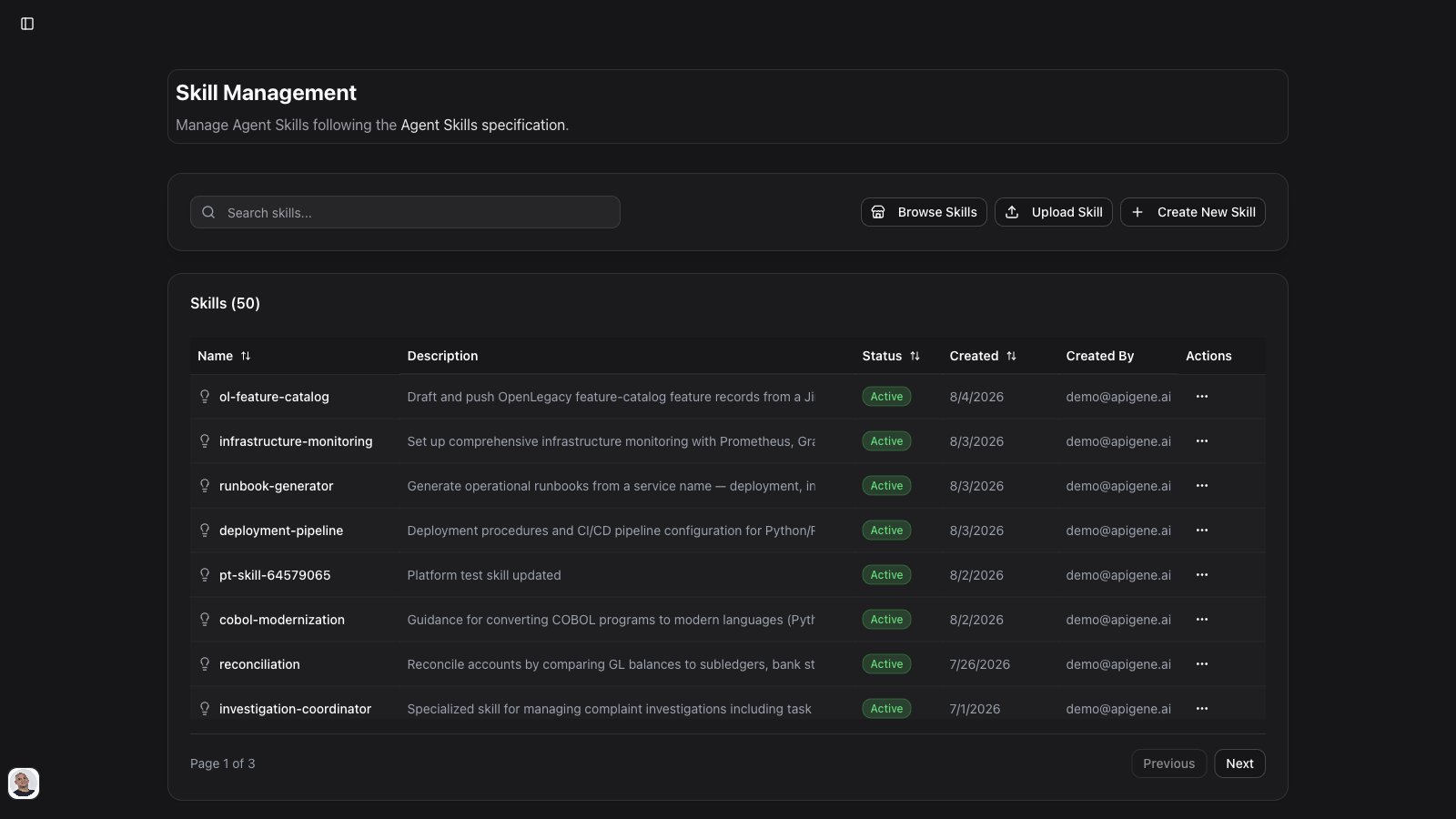
The Skills table lists all org skills with:
* **Name** and **description** (from frontmatter)
* **Search** and **sort** for large libraries
* **Edit** — update instructions and optional files
* **Download** — export the skill’s `SKILL.md` content as a Markdown file
* **Delete** — remove from the org library (does not remove from agents until you detach)
Open a skill to view full `SKILL.md` content, metadata, and packaged files.
## Attaching skills to agents
### From the Agents editor
1. Open **Agents** → select an agent → **Skills** tab
2. Add skills from your org library
3. Save the agent
### From Agent Builder
When building an agent in [Agent Builder](/user-guide/agent-builder), Copilot can:
1. Search your org library and the registry
2. Show a **skill proposals** card with recommended matches
3. Wait for you to install or select skills before calling `create_agent`
See [Agent Builder](/user-guide/agent-builder) for the full creation workflow.
## How agents use skills at runtime
In Chat and MCP Gateway **Agent mode**, the model:
1. Calls `list_skills` to discover attached skills (metadata only)
2. Calls `get_skill_content` for relevant skills before following their procedures
Skills are **not** fully loaded from summaries alone — the agent must fetch the full `SKILL.md` before applying a skill.
## Skill structure
A minimal skill:
```markdown theme={null}
---
name: code-review
description: Review pull requests for bugs, style, and security. Use when the user asks for a PR or code review.
---
# Code Review
## Steps
1. Read the diff summary
2. Check for security issues
3. Suggest concrete improvements
```
Put long reference material in `references/` files and link from the body (progressive disclosure).
## Best practices
**Write trigger-rich descriptions**
* The `description` in frontmatter is how the model decides *when* to activate the skill — include use cases and triggers there, not only in the body
**Keep SKILL.md focused**
* Core workflow in the body; detailed docs in `references/`
**Prefer org skills for team standards**
* Install registry skills for common patterns, then customize copies for your org
**Attach sparingly**
* A few well-chosen skills per agent beats attaching everything
## Skills vs Context
| | **Skills** | **Context** |
| ----------- | ----------------------------------- | ---------------------------------- |
| **Format** | `SKILL.md` (Agent Skills spec) | Free-form instructions / knowledge |
| **Purpose** | Procedures and workflows | Background facts and policies |
| **Runtime** | `list_skills` → `get_skill_content` | `list_contexts` → `get_context` |
Use both when an agent needs *how to work* (skills) and *what to know* (context).
## Troubleshooting
### Skill validation failed on upload
* Check frontmatter: `name` (lowercase, hyphens) and `description` (includes when-to-use triggers)
* Ensure the file is valid Markdown
### Agent ignores a skill
* Confirm the skill is attached on the agent **Skills** tab
* Make the description more specific about when to use the skill
* In Chat, ensure the agent (with skills attached) is selected via `@`
### Registry install failed
* Verify network access to the registry
* Try importing via **GitHub** if the skill is hosted in a public repo
## Next steps
* [Agent Builder](/user-guide/agent-builder) — create agents with skill proposals
* [Agents](/user-guide/agents) — attach skills and configure behavior
* [MCP Gateway Tools](/user-guide/mcp-gateway/mcp-gateway-tools) — `list_skills`, `get_skill_content`, `add_skill` in Agent mode
## Why use skills
* **Reuse** — write once, attach to many agents
* **Consistency** — standardized procedures (PR review, SEO audits, deploy runbooks)
* **Discoverability** — browse your library or install from the public registry
* **Compatibility** — Agent Skills format works across Apigene and external MCP clients
## Accessing Skills
Navigate to **Skills** from the main menu to open your organization skill library.
## Creating skills
### Upload a skill
1. Click **Upload Skill**
2. Choose a tab:
* **Upload** — upload a `SKILL.md` file (and optional `scripts/`, `references/`, `assets/` folders)
* **GitHub** — import from a public GitHub repository URL
3. Review validation results and save
Skills must follow the Agent Skills spec: valid `name` and `description` in frontmatter, with procedural content in the Markdown body.
### Generate with AI
Use **Generate Skill** to draft a `SKILL.md` from a short description. Edit the result before saving.
### Browse the registry
Click **Browse Skills** to search [skills.sh](https://skills.sh) — the public skill registry:
* Search by keyword or use case
* View install counts and source
* Install into your org library with one click
* Already-installed skills show an **Installed** badge
Installed registry skills become org skills you can attach to agents.
## Managing skills
The Skills table lists all org skills with:
* **Name** and **description** (from frontmatter)
* **Search** and **sort** for large libraries
* **Edit** — update instructions and optional files
* **Download** — export the skill’s `SKILL.md` content as a Markdown file
* **Delete** — remove from the org library (does not remove from agents until you detach)
Open a skill to view full `SKILL.md` content, metadata, and packaged files.
## Attaching skills to agents
### From the Agents editor
1. Open **Agents** → select an agent → **Skills** tab
2. Add skills from your org library
3. Save the agent
### From Agent Builder
When building an agent in [Agent Builder](/user-guide/agent-builder), Copilot can:
1. Search your org library and the registry
2. Show a **skill proposals** card with recommended matches
3. Wait for you to install or select skills before calling `create_agent`
See [Agent Builder](/user-guide/agent-builder) for the full creation workflow.
## How agents use skills at runtime
In Chat and MCP Gateway **Agent mode**, the model:
1. Calls `list_skills` to discover attached skills (metadata only)
2. Calls `get_skill_content` for relevant skills before following their procedures
Skills are **not** fully loaded from summaries alone — the agent must fetch the full `SKILL.md` before applying a skill.
## Skill structure
A minimal skill:
```markdown theme={null}
---
name: code-review
description: Review pull requests for bugs, style, and security. Use when the user asks for a PR or code review.
---
# Code Review
## Steps
1. Read the diff summary
2. Check for security issues
3. Suggest concrete improvements
```
Put long reference material in `references/` files and link from the body (progressive disclosure).
## Best practices
**Write trigger-rich descriptions**
* The `description` in frontmatter is how the model decides *when* to activate the skill — include use cases and triggers there, not only in the body
**Keep SKILL.md focused**
* Core workflow in the body; detailed docs in `references/`
**Prefer org skills for team standards**
* Install registry skills for common patterns, then customize copies for your org
**Attach sparingly**
* A few well-chosen skills per agent beats attaching everything
## Skills vs Context
| | **Skills** | **Context** |
| ----------- | ----------------------------------- | ---------------------------------- |
| **Format** | `SKILL.md` (Agent Skills spec) | Free-form instructions / knowledge |
| **Purpose** | Procedures and workflows | Background facts and policies |
| **Runtime** | `list_skills` → `get_skill_content` | `list_contexts` → `get_context` |
Use both when an agent needs *how to work* (skills) and *what to know* (context).
## Troubleshooting
### Skill validation failed on upload
* Check frontmatter: `name` (lowercase, hyphens) and `description` (includes when-to-use triggers)
* Ensure the file is valid Markdown
### Agent ignores a skill
* Confirm the skill is attached on the agent **Skills** tab
* Make the description more specific about when to use the skill
* In Chat, ensure the agent (with skills attached) is selected via `@`
### Registry install failed
* Verify network access to the registry
* Try importing via **GitHub** if the skill is hosted in a public repo
## Next steps
* [Agent Builder](/user-guide/agent-builder) — create agents with skill proposals
* [Agents](/user-guide/agents) — attach skills and configure behavior
* [MCP Gateway Tools](/user-guide/mcp-gateway/mcp-gateway-tools) — `list_skills`, `get_skill_content`, `add_skill` in Agent mode